Turn your farm or land into a 3D printed model
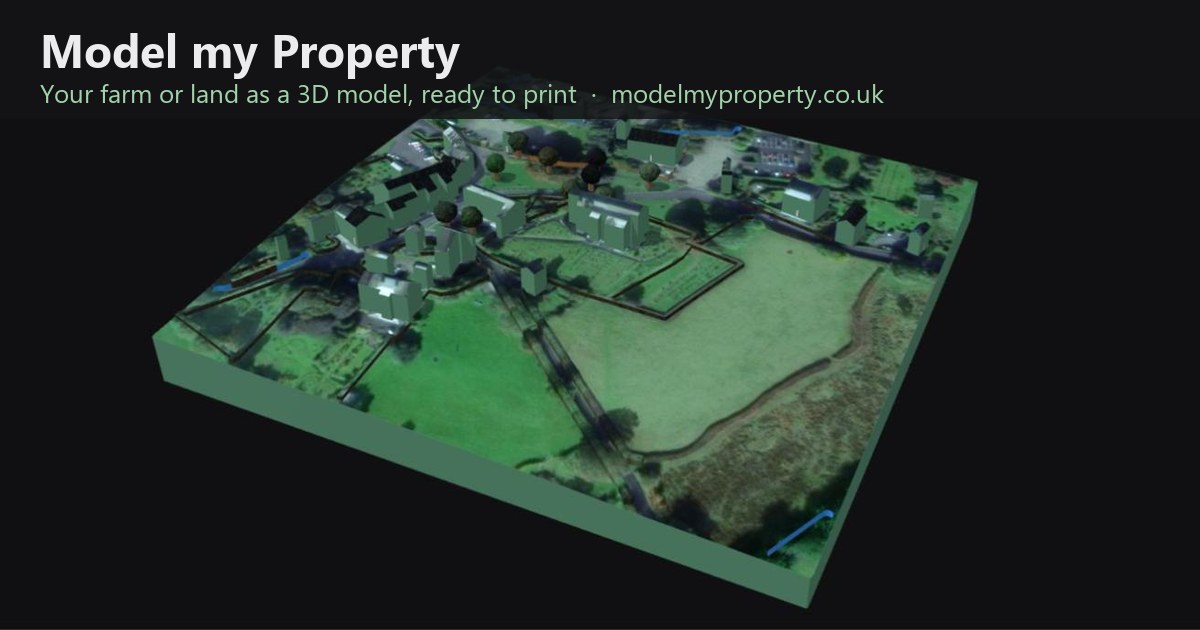
Model my Property is a free website that makes a realistic 3D model of your farm, smallholding, field or garden, with the real shape of the ground, your buildings, hedges and trees, ready to 3D print.
How it works
1. Draw around your land
Search for your farm or postcode area, then click around the edge of your land. In England and Wales you can pick your plot straight from the HM Land Registry boundary instead.
2. Let Auto model fill it in
One button adds what is on your land. The slider sets how much detail it gathers:
- OpenStreetMap: buildings, hedges, fences, walls, woods, trees, ponds, streams and tracks that are already mapped.
- Aerial photos: each roof's material and colour, such as slate, clay tiles, corrugated steel or thatch.
- Lidar: buildings with their real heights and roof shapes, single trees, woodland and hedges, found from 1 m laser survey data, which the site fetches for you in England (Environment Agency), Wales (DataMapWales), Scotland (Scottish Remote Sensing Portal), the Netherlands (AHN) and France (IGN LiDAR HD).
Anything it gets wrong can be moved, changed or deleted, and you can draw extra features by hand.
To have your fields found, measured and numbered automatically, use our sister site Auto Field Maps. Here you can still mark a field by hand to print its size on the model.
3. Check it in 3D
The model appears as you work, with the satellite picture or map on top, real terrain, shadows from the sun, and buildings with their roofs, doors and windows. You can put your own photos on the walls of a building, and turn the model round, full screen.
4. Download and print
Download an STL file for any 3D printer, a coloured OBJ for colour printing services, or a 3D viewer page that works offline, to share with family and friends. Choose the print size and the base thickness, and cut the model to the shape of your land if you like.
What people make with it
- A gift for a farm retirement, anniversary, wedding or sale.
- A display model for a farm shop, holiday let, office or show stand.
- A way to plan: see how the land lies, where water runs and how buildings sit.
- A record of a family farm as it is today.
Common questions
Is it free?
Yes. There is nothing to pay and nothing to install. The site is paid for by adverts.
Do I need a 3D printer?
No. You can send the downloaded file to any online 3D printing service or a local print shop, or just enjoy the 3D view.
Does it work outside England?
Yes. Drawing, terrain, OpenStreetMap features and 3D printing work anywhere. The automatic lidar download covers England, Wales, Scotland, the Netherlands and France; elsewhere the ground comes from worldwide elevation data, and you can add your own lidar files.
Can I use it on my phone or tablet?
Yes. You can also add it to your home screen so it opens like an app. On an iPhone or iPad, open the site in Safari, tap Share, then Add to Home Screen. On Android, or in Chrome or Edge on a computer, press Install app on the site or choose Install from the browser menu.
Is my data uploaded?
No. Your work is kept in your own browser, and files you add are read on your computer. See the privacy policy.
Guides
- A 3D printed model of your farm as a gift
- How to 3D print terrain from lidar
- How to make a 3D model of your house and garden
- Choosing the size, scale and height exaggeration
- Printing and painting a model of your land
- UK lidar explained: DTM, DSM and coverage
Map data © OpenStreetMap contributors. Lidar: Environment Agency, Welsh Government and Scottish Government, Open Government Licence v3.0; AHN (PDOK); IGN LiDAR HD. Boundaries: HM Land Registry INSPIRE Index Polygons, Crown copyright and database rights 2026, Ordnance Survey AC0000851063. Imagery © Esri, Maxar, Earthstar Geographics. About and contact · Privacy policy · Terms of use