Model my Property › 3D printed farm model
A 3D printed model of your own farm
A model of the farm itself, with the hills and valleys where they really are, the yard, the barns and the house, every hedge and wood, makes a gift that means far more than a photo. You can design one yourself, free, in a few minutes.
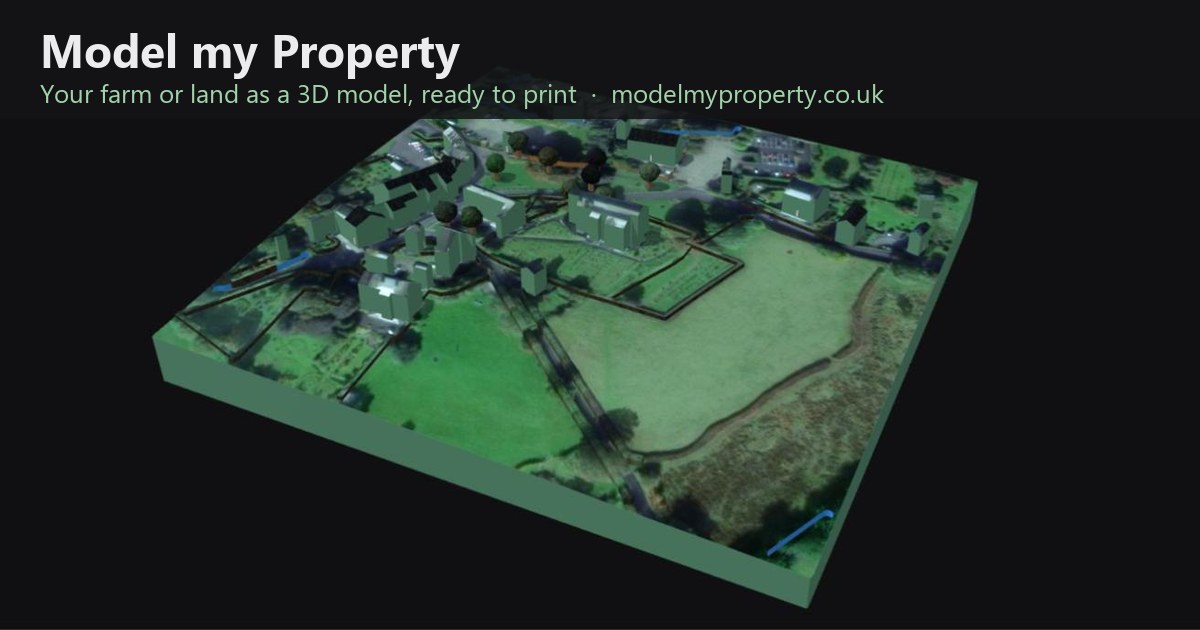
What goes on the model
- The real lie of the land. The ground is built from height data, in much of Britain, the Netherlands and France from 1 m lidar laser surveys, so slopes, banks, streams and valleys sit where they do on the farm.
- Buildings with their real roofs. Houses, barns, sheds and silos, with their heights and roof shapes, and roof materials such as slate, tiles or corrugated steel picked from aerial photos.
- Hedges, walls, fences and trees. Field boundaries stand up from the surface, so the pattern of the fields reads clearly even on a single-colour print.
- Names and field sizes. Add the farm name, field names or acreages as raised lettering, and a north arrow.
How to make one
1. Find the farm and draw around it
Search for the farm or postcode, then click around the edge of the land. In England and Wales you can pick the boundary straight from the HM Land Registry map instead.
2. Press Auto model
The site gathers what is already known about the land: buildings, hedges, woods, ponds and tracks from OpenStreetMap, roof colours from aerial photos and heights from lidar. Anything wrong can be moved or deleted, and anything missing drawn in by hand.
3. Check it in 3D
The model builds as you work, with the satellite picture on top. Turn it round and look at it from the yard, the top field or the lane. If the land is gentle, raise the vertical exaggeration so the slopes show up on the print.
4. Download and print
Choose the print width, from 60 mm up to 300 mm, and the base thickness. Then download the file that suits how it will be printed (see below).
Choosing how it is printed
One colour (STL)
The STL file prints on any home 3D printer, or at any online printing service. A single colour such as white, stone or green shows the shape of the land beautifully, and it can be painted afterwards. Larger farms can be split into 2 to 16 pieces that join with hidden bow-tie keys, so a big model can come off a small printer.
Full colour (OBJ)
The coloured OBJ carries the satellite picture, so fields, roofs and woods show in their real colours. Full-colour printing needs a specialist printing service; send them the OBJ and its picture file.
No printer?
You do not need one. Online 3D printing services will print and post the STL or OBJ, and many towns have a makerspace, library or print shop with a 3D printer. The free 3D viewer download also lets the family turn the model round on a screen, and on a phone the AR button stands the model on your table through the camera.
Displaying it
The STL can include a slot in the back and a matching stand, which holds the model upright at 75° like a picture frame. Laid flat, it suits a shelf, a farm shop counter or a glass case. A small plaque with the farm name and year finishes it off.
Ideas for the gift
- A retirement present for a farmer handing over the farm.
- A wedding or anniversary gift for a couple who farm together.
- A keepsake when a family farm is sold, so the land is remembered as it was.
- A present for children and grandchildren who grew up there.
- A display for a farm shop, holiday let, wedding venue or show stand.
Common questions
How big a farm can it model?
Anything from a smallholding to a large estate. The bigger the land, the smaller each building becomes at a given print size, so for a large farm a wider print or a split model keeps the buildings easy to see.
Does it cost anything?
Designing the model and downloading the files is free. You only pay for printing if you use a printing service.
Can I add the fields with their sizes?
Yes, mark a field by hand to print its size on the model. To have every field found, measured and numbered for you, use our sister site Auto Field Maps.
More: How it works · 3D print terrain from lidar · A 3D model of your house
Map data © OpenStreetMap contributors. Lidar: Environment Agency and others, under open licences. Imagery © Esri.